title: “Is It Safe to Let AI Run Code? Alibaba Open-Sources OpenSandbox to Solve This Problem” date: 2026-03-01 tags: [AI, Open Source, Security, Agent, Docker, Kubernetes, Alibaba] categories: [AI Engineering, Open Source] description: “OpenSandbox is Alibaba’s open-source sandbox platform built for AI applications — giving AI agents a secure, isolated environment to execute code without putting your host machine at risk.”
Is It Safe to Let AI Run Code? Alibaba Open-Sources OpenSandbox to Solve This Problem
The Problem: Just How Dangerous Is AI Code Execution?
If you’ve been using Claude Code, Cursor, or building your own AI agents lately, you’ve probably run into a scenario like this:
You ask an AI to write a script. It does — and then it runs that script directly on your local machine.
Sounds impressive, right? But think about what that actually means:
- AI-generated code runs directly on your operating system
- It can read and write your files, access your network, and even install software
- If the model hallucinates, or gets hit by a prompt injection attack, the consequences could be serious
This isn’t a hypothetical — it’s one of the biggest real-world blockers for deploying AI agents in production: the problem of securely isolating code execution.
Existing commercial solutions like E2B and Modal are either expensive or opaque. It’s hard for engineering teams — especially those with compliance requirements — to trust them fully in production environments.
Recently, Alibaba open-sourced OpenSandbox to tackle this problem head-on.
What Is OpenSandbox?
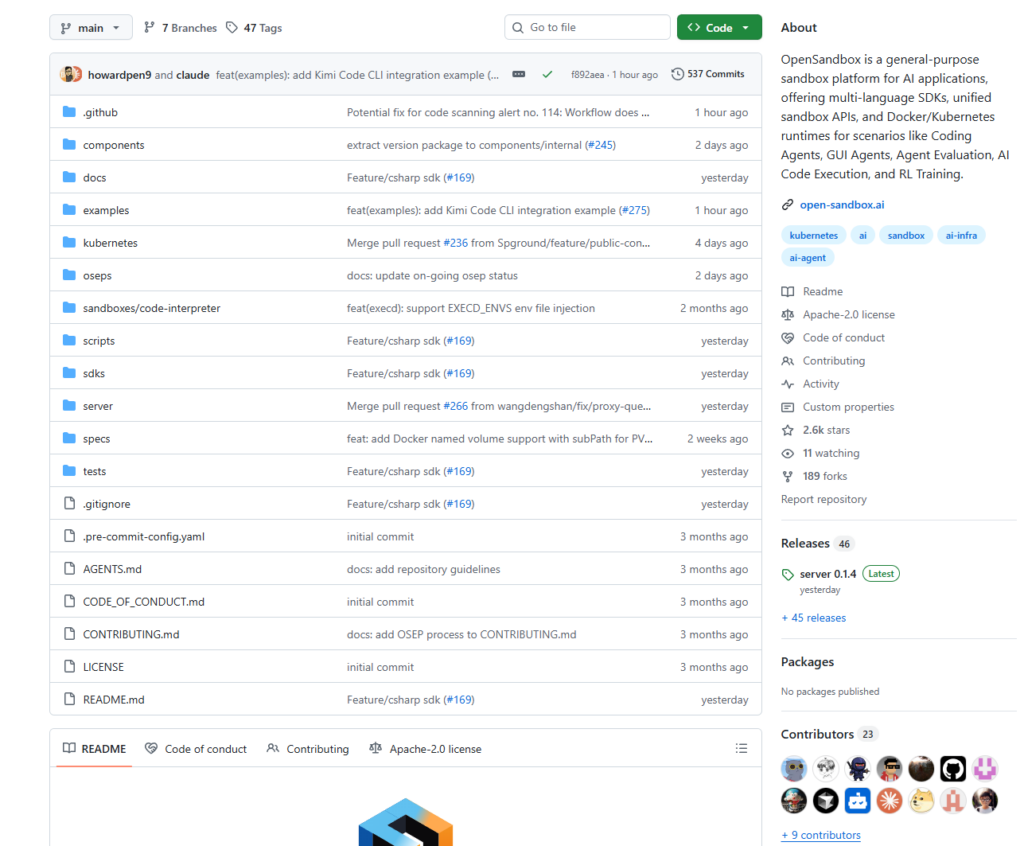
OpenSandbox is a general-purpose sandbox platform built for AI applications. It has already earned 2,400+ GitHub stars within weeks of launch, attracting widespread attention from the developer community.
In one sentence: it gives AI agents a safe, isolated, and controllable runtime environment — so models can actually “do things” without running loose on the host machine.
Its core capabilities include:
Multi-language SDK support. Python, Java/Kotlin, JavaScript/TypeScript, and C#/.NET are all covered, with Go on the roadmap. Your tech stack is unlikely to be a blocker.
Unified Sandbox API. OpenSandbox defines a standardized interface for sandbox lifecycle management and code execution. You can plug in custom sandbox runtimes without being locked into any specific platform.
Dual runtime support. Built-in Docker runtime for local development, and a high-performance Kubernetes runtime for production-scale distributed workloads — both sharing the same API surface.
Ready-to-use sandbox environments. Comes with built-in support for command execution, file system access, and a code interpreter. Common use cases work out of the box with no extra plumbing required.
Rich official examples. From coding agents (Claude Code, OpenAI Codex, Gemini CLI) to browser automation (Chrome, Playwright) and desktop environments (VNC, VS Code) — the official examples/ directory covers a wide range of real-world scenarios.
What Problems Does It Actually Solve?
1. Security Isolation
AI-generated code runs inside isolated containers, completely separated from the host machine. Even if the model produces harmful code, the blast radius is contained entirely within the sandbox.
2. Flexible Runtimes
Use Docker locally; switch to Kubernetes in production. The interface stays identical — no changes to your business logic required. This is critical for moving smoothly from prototype to production.
3. Extensibility
OpenSandbox defines an open protocol. Developers can implement custom sandbox runtimes rather than being locked into a single cloud provider or vendor.
4. Open Source + Self-Hosted
This is the key differentiator from commercial options like E2B. You can audit the full codebase, deploy on your own infrastructure, and keep data within your own boundaries — particularly valuable for regulated industries like finance and healthcare.
Getting Started in 5 Minutes
Here’s how to get up and running using the Python SDK.
Step 1: Start the Sandbox Server
# Install the server
pip install opensandbox-server

# Initialize config (Docker mode)
opensandbox-server init-config ~/.sandbox.toml --example docker

# Start the server
opensandbox-server
The server runs at http://localhost:8080 by default.
Step 2: Install the SDK
pip install opensandbox
Step 3: Create a Sandbox and Execute Code
import asyncio
from opensandbox import Sandbox
from opensandbox.models import WriteEntry

async def main():
    # 1. Create an isolated sandbox container
    sandbox = await Sandbox.create(
        "opensandbox/code-interpreter:v1.0.1",
        entrypoint=["/opt/opensandbox/code-interpreter.sh"],
        env={"PYTHON_VERSION": "3.11"},
    )

    async with sandbox:
        # 2. Run a shell command inside the sandbox
        result = await sandbox.commands.run("echo 'Hello OpenSandbox!'")
        print(result.logs.stdout[0].text)

        # 3. Write a file inside the sandbox
        await sandbox.files.write_files([
            WriteEntry(path="/tmp/hello.txt", data="Hello World", mode=644)
        ])

asyncio.run(main())
Every operation happens inside the isolated container. The host machine is completely unaffected.
Using OpenSandbox with Claude Code (Coding Agent Scenario)
The official repo also includes a deep integration example for Claude Code:
# Set environment variables
export SANDBOX_DOMAIN=localhost:8080
export ANTHROPIC_AUTH_TOKEN=your_token

# Run the Claude Code sandbox example
python examples/claude-code/main.py
Code generated by the AI executes automatically inside the sandbox. Results are returned to the model, and the entire agent loop stays within the secure boundary.
Supported Use Cases
OpenSandbox is designed to support the following scenarios out of the box:
Coding Agents. Tools like Claude Code, OpenAI Codex, and similar programming assistants need to actually run code to verify logic. A sandbox is non-negotiable infrastructure for these use cases.
GUI Agents. Combined with VNC or Chrome, OpenSandbox lets AI agents interact with browser interfaces to complete web automation tasks.
Agent Evaluation. Run large-scale, reproducible evaluations of AI agent capabilities in a standardized sandbox environment — ensuring fair and consistent benchmarking.
AI Code Execution Platforms. Provide safe, isolated code execution for online coding platforms or data analysis tools — essentially a cloud-native, security-hardened version of Jupyter Notebook.
Reinforcement Learning Training. Give RL agents a safe execution layer for interacting with environments, enabling faster and more reliable training loops.
Summary
OpenSandbox fills a critical gap in the infrastructure stack for production AI agent deployments.
It’s not an academic research project — it’s a practical, engineer-focused tool that works out of the box. Open source, self-hosted, multi-language SDK support, Docker and Kubernetes compatibility: these features together make it a genuinely competitive option among available solutions.
For developers building AI agent applications — especially teams with data security or compliance requirements — OpenSandbox is worth a serious look.
Project repository: https://github.com/alibaba/OpenSandbox
If you found this useful, consider sharing it with others building AI agents. Feedback and contributions to the project are always welcome.