No browser extension. No Python. No screenshots. One line of JS — and your web app becomes an AI Copilot.
1. The Problem: Why Is Web Automation Still So Painful?
If you’ve worked with Selenium, Playwright, or the more recently hyped browser-use, you’ve likely run into the same frustrations:
- Heavy environments: Python runtimes, headless browsers, layers of dependencies — complex to deploy, costly to maintain.
- Screenshot-dependent pipelines: Many modern agents rely on multimodal models to “see” the page via screenshots — slow, expensive, and unreliable.
- High permission requirements: Controlling a browser often demands elevated system-level access.
- Steep integration costs: Want to add an AI Copilot to your SaaS product? That might mean rewriting your backend.
The root cause of all these issues is the same: traditional web automation works by controlling the browser from the outside — like trying to type through a glass wall.
Alibaba’s open-source project PageAgent takes a fundamentally different approach: let the AI agent live inside the page itself.
2. What Is PageAgent?
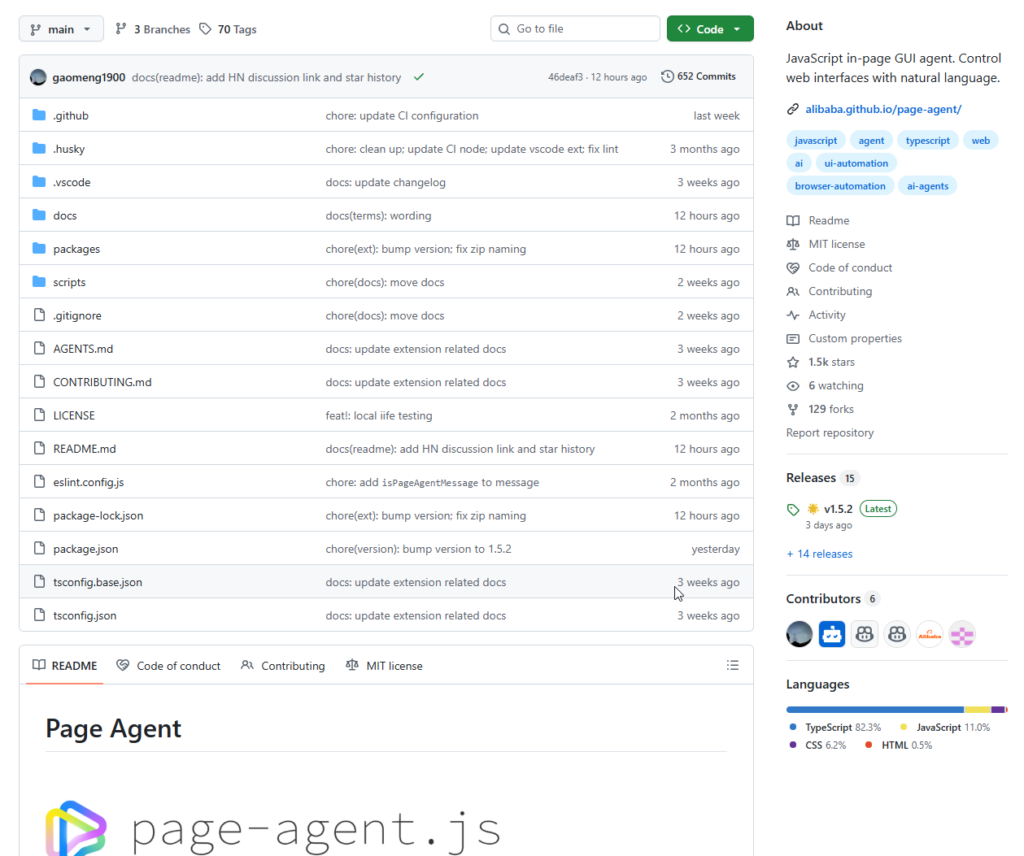
PageAgent (github.com/alibaba/page-agent) is a pure-frontend JavaScript GUI agent framework.
Its philosophy in one sentence:
The GUI Agent Living in Your Webpage.
What Can It Do?
Control any web interface using natural language. Tell it “click the login button”, “change the company name in the form to Alibaba”, or “find the most recent orders and export them” — and it actually does it.
How Lightweight Is It?
- ✅ Pure JavaScript — drop it into any webpage
- ✅ No browser extension required (optional plugin for multi-tab scenarios)
- ✅ No Python or headless browser
- ✅ No screenshots, no OCR, no multimodal models
- ✅ No special system permissions
PageAgent reads and operates on the page’s DOM directly. It sends a cleaned DOM structure to an LLM, which decides the action steps, and PageAgent executes them — all inside the browser.
Key Use Cases
- SaaS AI Copilot: Add AI-assisted navigation to your product with just a few lines of code — no backend changes needed.
- Intelligent form filling: Turn a 20-click workflow into a single sentence.
- Accessibility: Enable natural language or voice control for any web application.
- ERP / CRM productivity: These complex interfaces are exactly where PageAgent excels.
3. Architecture: How Does It Work?
PageAgent is a well-structured monorepo. Each package has a clear responsibility:
packages/
├── core/            # Core agent logic (UI-free)
├── page-agent/      # Main entry point with built-in UI panel
├── page-controller/ # DOM manipulation layer (LLM-agnostic)
├── ui/              # Panel UI (decoupled from agent logic)
├── llms/            # LLM client adapters
└── extension/       # Chrome extension (multi-tab support, WIP)
The Execution Flow
- User inputs a natural language command (e.g., “Search for the latest orders”).
- PageAgent cleans and extracts a semantic structure from the current page’s DOM.
- The simplified DOM + command is sent to an LLM (Qwen, OpenAI, etc.).
- The LLM returns a series of action steps (which element to click, what text to type).
page-controllerexecutes the DOM operations.- The loop continues until the task is complete.
Key Differentiator: No Screenshots
Most competing solutions — including the original browser-use approach — send screenshots to a vision model for interpretation. PageAgent reads the DOM directly, which means:
- Faster — no image processing overhead
- Cheaper — no multimodal model required
- More accurate — structured data beats visual inference
4. How to Use It
Option 1: Quickest Start — Live Demo
Visit alibaba.github.io/page-agent and use the project’s free demo API (rate-limited, for technical evaluation only). Type a command and watch PageAgent act on the page in real time.
Option 2: Programmatic Integration (BYOK)
npm install page-agent
import { PageAgent } from 'page-agent'

const agent = new PageAgent({
  model: 'qwen3.5-plus',
  baseURL: 'https://dashscope.aliyuncs.com/compatible-mode/v1',
  apiKey: 'YOUR_API_KEY',
  language: 'en-US',
})

// Execute tasks using natural language
await agent.execute('Click the Login button')
await agent.execute('Fill in the username field with admin')
await agent.execute('Find orders from the past 7 days and export as Excel')
Works with any LLM service that’s OpenAI-API-compatible — including Alibaba Cloud Dashscope (Qwen), OpenAI, Anthropic, and others.
Option 3: Multi-Tab Mode — Chrome Extension
For complex tasks spanning multiple browser tabs, install the companion Chrome extension (currently marked as WIP). Once configured with your API key, the agent’s scope extends from a single page to the entire browser session.
Privacy & Security
PageAgent uses a BYOK (Bring Your Own Key) architecture:
- Data flows only between your browser and your chosen LLM provider.
- The project has no backend — nothing is collected or transmitted externally.
- Your API key is stored only in the browser’s local storage.
- No configuration is synced to any external server.
5. How Does It Compare?
| Feature | PageAgent | browser-use | Playwright / Selenium |
|---|---|---|---|
| Runtime environment | Pure browser JS | Python + browser | Python/Node + headless browser |
| Requires screenshots | ❌ No | ✅ Yes | ❌ No |
| Multimodal model needed | ❌ No | ✅ Yes | ❌ No |
| Embed into existing products | ✅ Very easy | ❌ Difficult | ❌ Difficult |
| Best for | Frontend enhancement / Copilot | Server-side automation | Testing / server-side automation |
It’s worth noting that PageAgent’s README openly acknowledges browser-use as an inspiration — its DOM processing component and parts of the prompt design draw from that project, under the MIT license. A refreshingly transparent credit.
6. Summary: Who Is PageAgent For?
PageAgent is a focused, well-reasoned open-source project. Its core value proposition is lightweight embeddability.
It’s a great fit if you are:
- 🎯 A frontend developer who wants to quickly add an AI Copilot to an existing SaaS or admin panel
- 🎯 An RPA or automation engineer looking to reduce environment dependencies
- 🎯 A team that wants to bring natural language interaction to legacy internal systems (ERP, CRM)
- 🎯 A researcher interested in client-side Web Agent architectures
A few things to keep in mind:
- The Chrome extension is still under active development (WIP).
- Cross-domain and session-state edge cases may require additional handling.
- The demo API is for evaluation only — production usage requires your own LLM API key.
The broader trend is clear: AI’s integration with the web is shifting from “control the browser from the server” toward “agents that live inside the page.” PageAgent is a well-executed step in that direction, and one worth watching.
🔗 GitHub: github.com/alibaba/page-agent
📖 Documentation: alibaba.github.io/page-agent