1. The “Last Mile” Problem of AI Agents
Everyone talks about how powerful AI Agents are — they can plan, reason, and write code. But one problem keeps getting overlooked: Agents simply cannot use most real-world software.
Want an Agent to batch-process images in GIMP? No API. Want it to control Blender to render a scene? You’re stuck with screenshot-based clicking — fragile enough to break at the slightest UI change. Want an Agent to auto-generate LibreOffice reports? You’re limited to a “stripped-down” Python wrapper that loses 90% of the native functionality.
The three mainstream approaches all hit dead ends:
- GUI Automation (RPA): Simulates mouse and keyboard clicks — breaks the moment the interface updates, extremely brittle
- Official APIs: The vast majority of professional software doesn’t have one, or has an incomplete interface
- Re-implementing from scratch: Enormous engineering effort, and you’ll never match the full capability of the native software
The root problem is this: virtually all software today is designed for human users, not for Agents.
A research team at the Hong Kong University Data Intelligence Systems Lab (HKUDS) has a different answer — CLI-Anything.
2. What Is CLI-Anything?
CLI-Anything is an open-source Claude Code plugin with one core capability: automatically generating an Agent-native command-line interface (CLI) for any software that has source code.
Its underlying logic comes from a straightforward insight: the CLI is the universal interface shared by both humans and AI Agents.
Why is CLI naturally suited for Agents?
- Structured and composable: Text commands naturally match the LLM input format and can be freely chained into complex workflows
- Self-describing: A single
--helplets the Agent discover all available functionality at runtime — no need to hand-write API documentation - Agent-friendly: Built-in
--jsonflag means every command outputs structured JSON, requiring zero additional parsing from the Agent - Deterministic and reliable: Stable, consistent output makes Agent behavior predictable and verifiable — Claude Code already executes thousands of real tasks via CLI every day
A Fully Automated 7-Stage Pipeline
The heart of CLI-Anything is a fully automated 7-stage generation pipeline:
Analyze Architecture → Design CLI → Implement Modules → Plan Tests → Write Tests → Generate Docs → PublishThe entire process requires zero human intervention. The final output is a Python CLI package with the following features:
- REPL interactive mode: Supports iterative, conversational operation
- JSON output mode: The
--jsonflag lets Agents consume structured data directly - Undo/Redo: Full session state management
- Complete test coverage: Unit tests + end-to-end tests — across 9 applications, 1,436 tests with a 100% pass rate
- Self-describing documentation: Every command comes with full
--helptext that Agents can discover at runtime
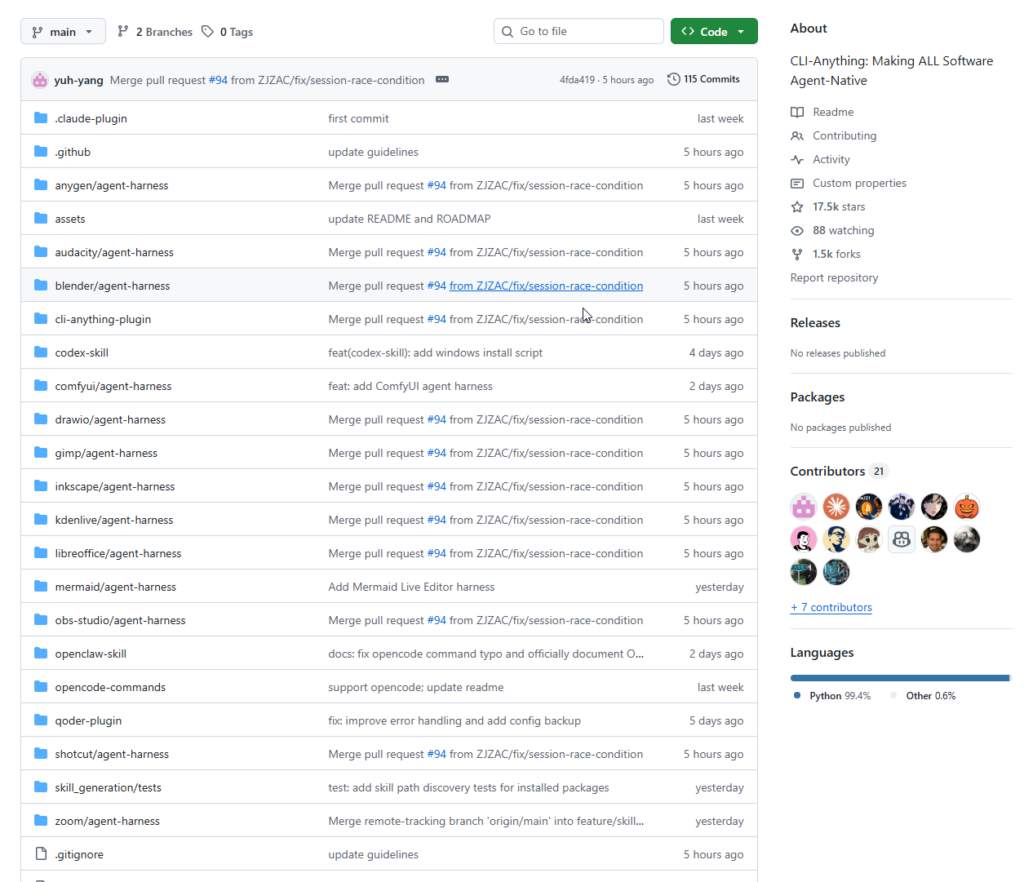
Supported Software Ecosystem
CLI-Anything has already generated ready-to-use CLI interfaces for a wide range of popular open-source software:
| Category | Representative Software |
|---|---|
| Creative Tools | GIMP, Blender, Inkscape, Audacity, Kdenlive, Shotcut, OBS Studio |
| AI Platforms | Stable Diffusion WebUI, ComfyUI, InvokeAI, AnythingLLM |
| Office Suites | LibreOffice (Writer / Calc / Impress) |
| Data Tools | JupyterLab, DBeaver, Apache Superset, Metabase |
| Developer Tools | Jenkins, Gitea, Portainer, pgAdmin, SonarQube |
| Diagramming | Draw.io, Mermaid, PlantUML, Excalidraw |
3. How to Use It
3.1 Installation (Claude Code Plugin — Recommended)
Run two commands inside a Claude Code session:
# Step 1: Add the plugin marketplace
/plugin marketplace add HKUDS/CLI-Anything

# Step 2: Install the plugin
/plugin install cli-anything
No additional configuration needed — install and go.
Windows users: Claude Code executes commands via bash, so you’ll need Git for Windows (which includes bash and cygpath) installed beforehand, or use WSL — otherwise you’ll hit a
cygpath: command not founderror.
3.2 Manual Installation (No Claude Code Required)
git clone https://github.com/HKUDS/CLI-Anything.git
cp -r CLI-Anything/cli-anything-plugin ~/.claude/plugins/cli-anything
# Reload plugins inside Claude Code
/reload-plugins
3.3 Generate a CLI for Any Software
Once installed, simply pass a local path or GitHub repository URL to the plugin — the 7-stage pipeline runs automatically:
# Generate a CLI from local GIMP source (all 7 stages run automatically)
/cli-anything ./gimp

# Build directly from a GitHub repository
/cli-anything https://github.com/blender/blender
3.4 Install and Use the Generated CLI
After generation, install the CLI to your system PATH:
cd gimp/agent-harness
pip install -e .

# Verify installation
which cli-anything-gimp

# See all available commands
cli-anything-gimp --help

# Enter interactive REPL mode
cli-anything-gimp

# Output structured JSON for Agent consumption
cli-anything-gimp --json layer add -n "Background" --type solid --color "#1a1a2e"
3.5 Incremental Coverage Refinement
If the generated CLI doesn’t cover everything you need, use the refine command to run a gap analysis and fill in the missing pieces. It can be run multiple times — each pass is incremental and non-destructive:
# Full refinement — automatically analyzes coverage gaps across all features
/cli-anything:refine ./gimp

# Targeted refinement — focus on a specific functional area
/cli-anything:refine ./gimp "I need more CLI coverage for batch image processing and filters"
/cli-anything:refine ./blender "particle systems and physics simulation"
3.6 Run Tests and Validate
# Run the test suite
cd gimp/agent-harness
python3 -m pytest cli_anything/gimp/tests/ -v

# Validate the CLI against the standard specification
/cli-anything:validate ./gimp
3.7 Support for Other AI Coding Tools
Beyond Claude Code, CLI-Anything supports other popular AI coding tools as well:
OpenCode:
cp CLI-Anything/opencode-commands/*.md ~/.config/opencode/commands/
cp CLI-Anything/cli-anything-plugin/HARNESS.md ~/.config/opencode/commands/
After installation you get 5 slash commands: /cli-anything, /cli-anything-refine, /cli-anything-test, /cli-anything-validate, and /cli-anything-list.
Codex:
bash CLI-Anything/codex-skill/scripts/install.sh4. Summary
CLI-Anything advances a genuinely forward-looking proposition: today’s software is designed for humans, but tomorrow’s users will be Agents — and we need to build the infrastructure for that transition now.
Its core value comes down to four things:
Sidesteps the brittleness of GUI automation entirely. No screenshots, no click simulation — it interfaces directly with the software’s real backend, preserving 100% of native functionality with stable, predictable behavior.
One command, any software. As long as source code is available — whether it’s GIMP, Blender, LibreOffice, or your own internal tooling — a production-ready Agent CLI can be generated with a single command.
Agent-first design philosophy throughout. Structured JSON output, --help self-description, REPL mode, comprehensive test coverage — every design decision lowers the barrier for Agents to use the generated interface.
Multi-platform, multi-tool ecosystem. Claude Code, OpenCode, Codex — CLI-Anything is platform-agnostic by design, and is actively expanding support to more AI coding tools.
If you are building AI Agents that need to operate real-world software, CLI-Anything deserves serious consideration. It is likely the most systematic and complete open-source solution in this space today.
Repository: https://github.com/HKUDS/CLI-Anything
Website: https://clianything.org