90% of your RAG pipeline’s output quality is determined by your PDF parser.
1. What Problem Does It Solve?
PDF is the most widely used document format in enterprise environments — but it was never designed to be read by machines. When you feed PDFs into a RAG system, three critical failures tend to emerge:
① Scrambled Reading Order Multi-column PDFs (academic papers, magazines, financial reports) get read left-to-right across the full page width, mixing content from different columns. The LLM receives semantically incoherent text.
② Lost Table Structure Row-column relationships and merged cells vanish entirely. Financial data and technical specifications collapse into unformatted walls of text.
③ No Source Coordinates Without positional metadata, there is no way to trace an AI-generated answer back to its exact location in the original PDF — which kills user trust.
Beyond these issues, accessibility regulations are now globally enforced (EAA, ADA/Section 508, Korea Digital Inclusion Act). Manual PDF remediation costs $50–$200 per document and simply does not scale.
OpenDataLoader-PDF was built specifically to solve all of this.
2. What Is It?
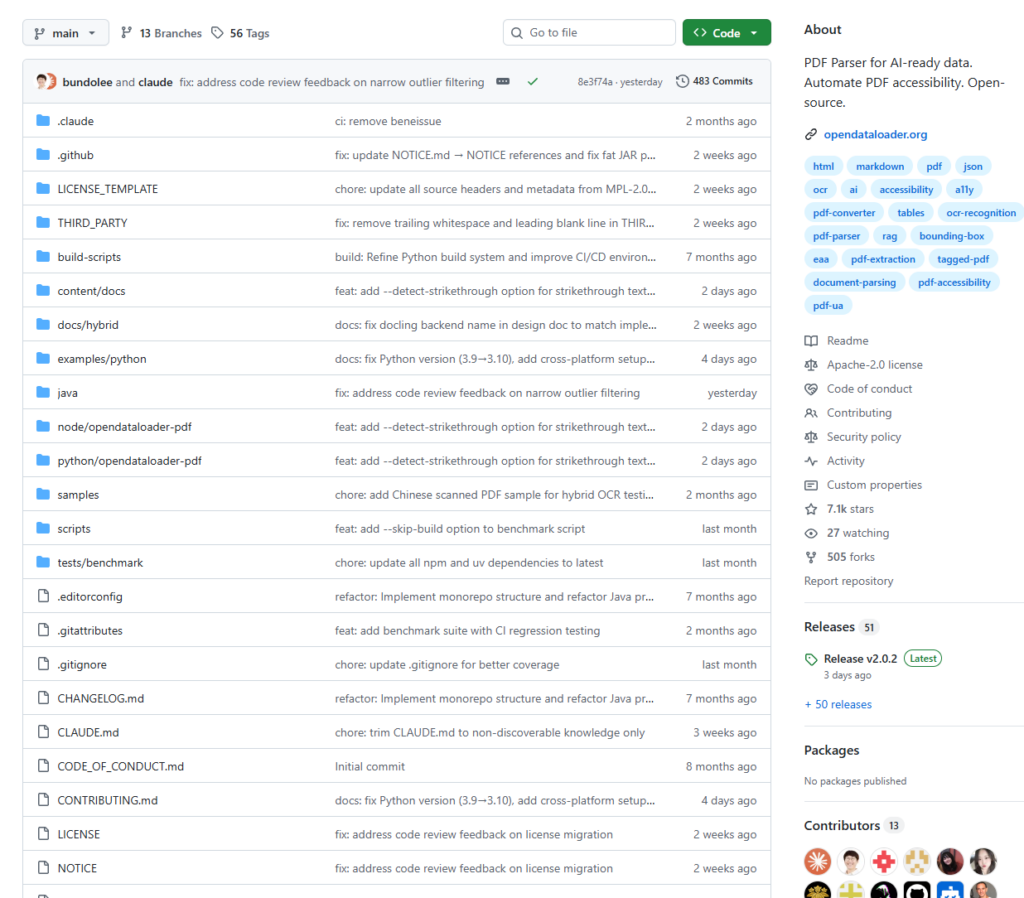
OpenDataLoader-PDF is an open-source PDF parsing SDK developed by a team within Hancom, a South Korean software company. It was built in collaboration with the PDF Association and Dual Lab — the developers of veraPDF, the industry-standard PDF/UA validation tool.
Core positioning: A structured PDF extraction engine designed specifically for RAG pipelines and LLM applications.
GitHub: github.com/opendataloader-project/opendataloader-pdf License: Apache 2.0 (no copyleft obligations from v2.0 onwards) Stars: ~762 and actively maintained (latest: v2.0.2)
Key Capabilities
🔢 XY-Cut++ Reading Order Algorithm Correctly handles multi-column layouts and outputs text in the order a human would actually read it. This is the core technical differentiator from competing tools.
📦 Bounding Box Output for Every Element Every extracted element — headings, paragraphs, tables, images — includes [x1, y1, x2, y2] coordinates, enabling precise source highlighting and citation linking directly on the original PDF.
🤖 Hybrid Mode (AI-Enhanced) The default mode uses fully local heuristic rules. Hybrid mode optionally calls an LLM to enhance OCR and complex table recognition across 80+ languages, making it suitable for low-quality scanned documents (300 DPI+).
📊 Multi-Format Output A single conversion can simultaneously produce Markdown, JSON, HTML, and Tagged PDF — parse once, use everywhere.
🛡️ Built-In AI Safety Filtering Automatically filters hidden text, off-page content, and prompt injection attempts, preventing malicious PDFs from poisoning your RAG system.
♿ PDF Auto-Tagging for Accessibility (Coming Soon) The first end-to-end open-source Tagged PDF generation pipeline. Scheduled for Q2 2026 — the core workflow will be free and open.
Benchmark Results
Tested against 200 real-world PDFs (including multi-column layouts and academic papers), the results are:
| Tool | Overall | Reading Order (NID) | Tables (TEDS) | Headings (MHS) |
|---|---|---|---|---|
| opendataloader (hybrid) | 90% | 94% | 93% | 83% |
| docling | 86% | 90% | 89% | 80% |
| marker | 83% | 89% | 81% | 80% |
| mineru | 82% | 86% | 87% | 74% |
| pymupdf4llm | 57% | 89% | 40% | 41% |
| markitdown | 29% | 88% | 0% | 0% |
Ranked #1 overall, with table extraction being particularly strong — 93% accuracy in hybrid mode, compared to 40%–89% across competing tools.
3. How to Use It
Option 1: Python (Fastest to Start)
pip install -U opendataloader-pdf
import opendataloader_pdf

opendataloader_pdf.convert(
    input_path=["document.pdf"],
    output_dir="output/",
    format="json,html,pdf,markdown"
)
Three lines of code. Four output formats. Done.
Option 2: RAG Pipeline with LangChain
pip install -U langchain-opendataloader-pdf
from langchain_opendataloader_pdf import OpenDataLoaderPDFLoader

# Single file
loader = OpenDataLoaderPDFLoader(file_path="document.pdf", format="markdown")
documents = loader.load()

print(documents[0].page_content)
print(documents[0].metadata)
# {'source': 'document.pdf', 'format': 'markdown', 'page': 1}

# Batch: multiple files or an entire directory
loader = OpenDataLoaderPDFLoader(
    file_path=["report1.pdf", "report2.pdf", "documents/"]
)
docs = loader.load()
Supported output formats:
text— Plain text, suitable for simple RAGmarkdown— Preserves headings, lists, and table structure; recommended for chunkingjson— Structured data with bounding boxes, ideal for source attributionhtml— Styled HTML output
Option 3: Docker CLI
docker pull ghcr.io/opendataloader-project/opendataloader-pdf-cli:1.3.0
Recommended if you prefer not to install Java dependencies on the host (the underlying engine is Java-based; the Python package is a wrapper layer).
Option 4: Node.js / Java
npm i @opendataloader/pdf
A Java SDK is also available via Maven/Gradle. Example projects can be found in opendataloader-project/opendataloader-pdf-examples.
JSON Output Example
The JSON schema is clean and complete — every element carries full metadata:
{
  "type": "heading",
  "id": 42,
  "level": "Title",
  "page number": 1,
  "bounding box": [72.0, 700.0, 540.0, 730.0],
  "heading level": 1,
  "font": "Helvetica-Bold",
  "font size": 24.0,
  "content": "Introduction"
}
With bounding box coordinates, your frontend can highlight the exact source location in the original PDF — giving every AI-generated answer a verifiable, clickable citation.
4. Summary
| Dimension | Assessment |
|---|---|
| Clarity of positioning | ⭐⭐⭐⭐⭐ Explicitly built for RAG/LLM pipelines |
| Accuracy | ⭐⭐⭐⭐⭐ #1 in comprehensive benchmarks (0.90) |
| Ease of use | ⭐⭐⭐⭐ Python up in 3 lines; native LangChain integration |
| Privacy / local-first | ⭐⭐⭐⭐⭐ Fully local execution, no GPU or API keys required |
| Open-source friendliness | ⭐⭐⭐⭐⭐ Apache 2.0 — safe for commercial projects |
| Maturity | ⭐⭐⭐⭐ Actively maintained, though some features (Tagged PDF) are still in progress |
OpenDataLoader-PDF has carved out a clear differentiation in a crowded field: it does not merely “read PDFs” — it addresses every detail that a production RAG pipeline actually needs. Reading order, table structure, coordinate-based attribution, safety filtering, and local-first execution have all been thought through.
If you are building document Q&A systems, enterprise knowledge bases, or any AI application that depends on PDF data, this tool deserves serious evaluation. At minimum, it belongs on your comparison test list.
Project: github.com/opendataloader-project/opendataloader-pdf