Ever been frustrated because your Kindle books won’t open on your phone, the EPUB you downloaded refuses to load on your e-reader, or your library of hundreds of ebooks is a total mess with no way to find what you want? If any of that sounds familiar, it’s time to meet Calibre.
What Problem Does It Solve?
The digital reading age has a fragmentation problem. EPUB, MOBI, AZW3, PDF, TXT — every device and platform speaks its own dialect, and they rarely get along. Add a few hundred (or thousand) ebooks to the mix, and keeping your library organized starts to feel like a full-time job.
Calibre was built specifically to fix this. Here’s what it tackles:
Format lock-in: Convert freely between formats so your books work on any device — Kindle, Kobo, smartphone, or tablet.
Library chaos: Manage your entire collection in one place, with automatic fetching of titles, authors, covers, and descriptions to keep everything looking clean and searchable.
Device friction: Connect your e-reader directly and send books to it in a single click — no manual file copying required.
Access limitations: Run a built-in content server so you can browse and download your own library from any browser on your home network.
What Is Calibre?
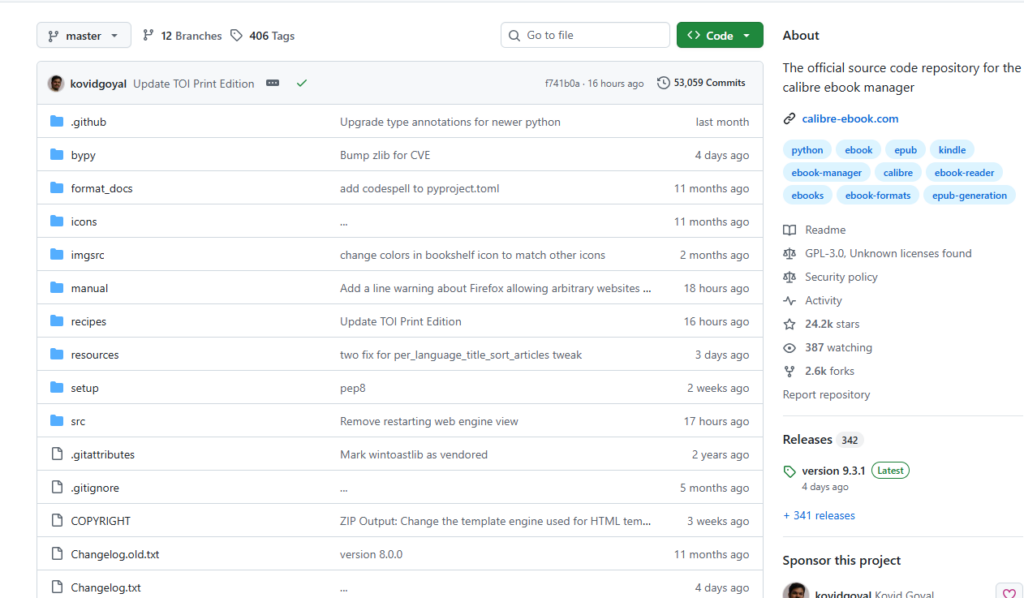
Calibre (stylized in all lowercase) is a completely free, open-source ebook management application created by Kovid Goyal in 2006. It started as a personal project to use a Sony e-reader on Linux, and has since grown into arguably the most fully featured ebook tool in existence.
📦 GitHub: github.com/kovidgoyal/calibre — 24,200+ stars
The latest release is v9.3.1 (February 2026), available on Windows, macOS, and Linux. It’s used in over 200 countries with more than 3 million active installs.
Core Features at a Glance
- 📚 Library Management — Manage all your ebooks in one unified view, with cover grid, list, and bookshelf layouts
- 🔄 Format Conversion — Convert between virtually every major format: EPUB, MOBI, AZW3, PDF, DOCX, TXT, and more
- ✏️ Ebook Editor — A built-in professional editor for directly modifying EPUB and AZW3 files
- 📡 Metadata Fetching — Automatically pulls titles, authors, covers, ISBNs, and ratings from the web
- 📰 News Download — Converts RSS feeds and online newspapers (The Economist, NYT, The Guardian, etc.) into ebook format on a schedule
- 📱 Device Management — Direct wired support for Kindle, Kobo, Sony readers, and more
- 🌐 Content Server — Host your own personal library server with OPDS support
- 🤖 AI Integration (since v8.11.1) — Connect to Google AI, GitHub Models, Ollama, LM Studio, and others to chat with your books
- 🔌 Plugin Ecosystem — Hundreds of community plugins for practically unlimited extensibility
How to Use It
Step 1: Download and Install
Head to calibre-ebook.com and download the installer for your platform. No account needed, no trials, no fees — just download and run.
Step 2: Import Your Ebooks
Click “Add books” in the top-left toolbar and select your ebook files. You can import an entire folder at once. Calibre will parse the files and add them to your library automatically.
Step 3: Fetch Metadata
Select a book, right-click, and choose Edit metadata → Download metadata and covers. Calibre will reach out to online databases and pull in the correct title, author, synopsis, and cover image — transforming a folder of mystery files into a proper, visually appealing library.
Step 4: Convert Formats
Select the book you want to convert, click “Convert books” in the toolbar, choose your target format (for example, EPUB to MOBI for Kindle), and hit OK. It takes seconds, even for large files.
Step 5: Send to Your Device
Plug in your Kindle or other reader via USB — Calibre detects it automatically. Select your book, click “Send to device”, and you’re done. You can also send books wirelessly via the Send-to-Kindle email feature.
Step 6 (Advanced): Subscribe to News
Click “Fetch news” in the menu bar to access hundreds of pre-configured news sources — The Economist, The Guardian, The New York Times, and many more. Set a download schedule and Calibre will automatically generate a fresh ebook each morning and push it to your device. Reading the news on your e-ink screen has never been this satisfying.
Power Users: The Command Line
Calibre ships with robust CLI tools for batch processing and automation:
# Convert formats
ebook-convert input.epub output.mobi

# Update metadata
calibredb set_metadata --field title:"New Title" BOOK_ID

# List all books in your library
calibredb list
Final Thoughts
Calibre is a rare kind of software: one that puts users first, refuses to lock you into any platform or ecosystem, and just quietly solves real problems. Twenty years of continuous development, a steadfast commitment to open source, and a thriving plugin community — it’s the product of Kovid Goyal and countless volunteers who share a single belief: people should own and control their own digital reading experience.
If you’re a serious reader with a growing digital library, Calibre is essential infrastructure. If you’re just starting to build one, it’s the best place to begin.
One-line verdict: Calibre is the Swiss Army knife of ebooks — free, powerful, cross-platform, and once you use it, you won’t go back.
📌 GitHub: github.com/kovidgoyal/calibre
🌐 Official site: calibre-ebook.com
💬 Community: MobileRead Forums